
New class! EDU642, Creating Instructional Media. Umm... a whole course about design principles and time to create?
Hello, geek-mode! I have already bragged on Instagram to my friends around the world (who really probably don't care) about my excitement for this course. Using CARP with Students
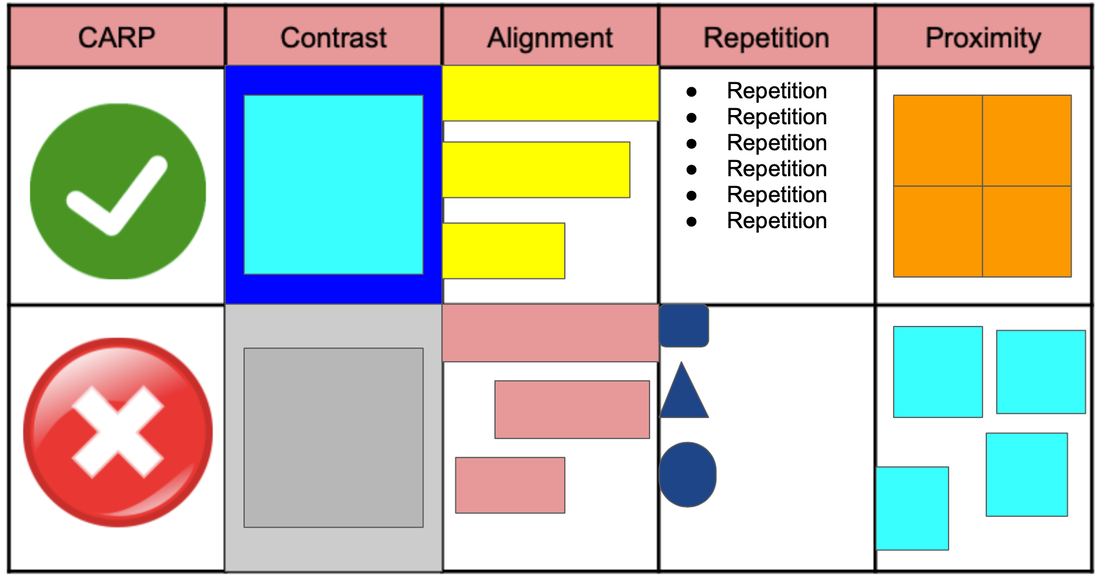
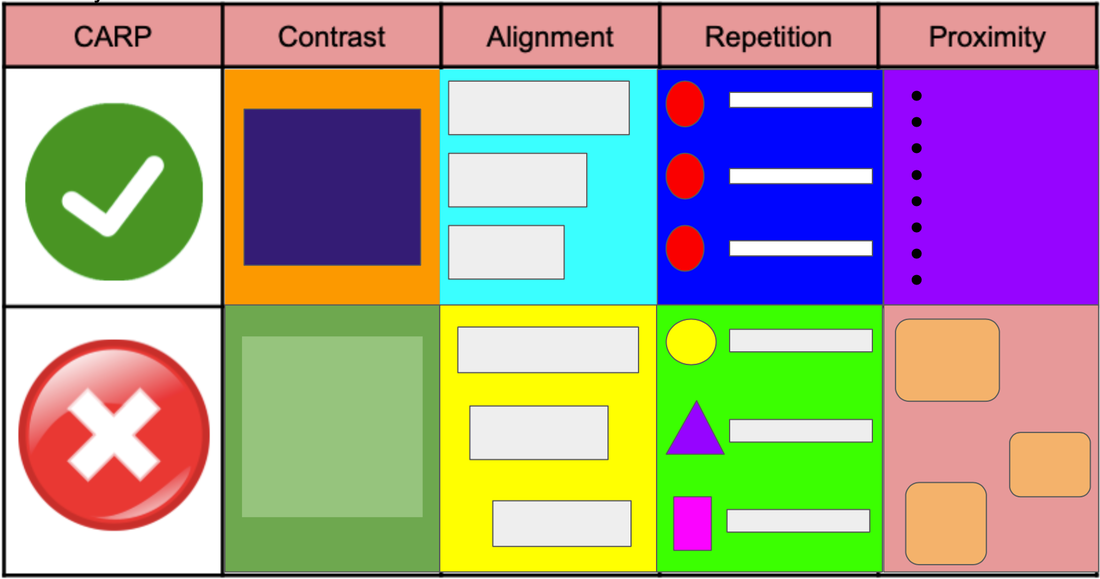
I have already incorporated design principles into Studio4 at my school. We use "CARP" instead of C.R.A.P. because, grade 4s. This is the second year in a row I have pushed for it it with my team members, and we actually had a three week How We Express Ourselves unit with a focus on visual literacy, which CARP really was the baseline of. This prepared them for their upcoming Sharing the Planet unit, where reading and creating infographics is a huge focus.
Here are some videos from Keri-Lee Beasely that we use with the students
So, how does this knowledge help students?
"No secret teacher-business" is a common phrase at my school. Be open and honest with students so they have a better understanding of why things are the way they are. This thought could be applied to design as well. I am sure teachers around the world ask their students to create posters, videos, etc. all of the time. But do they teach them how to make those creations visually appealing to the human eye? And why certain things look better? If we do, it teaches a lot about shape and space, colours, and how the human brain takes information in. We also have our students focus on audience and purpose. Who are you making this for and why? How does this affect your design?
I think CARP/CRAP is a great, simple place to start with students, or even as a designer yourself. I would not hesitate to run a workshop with staff members on the principles of design so they can help guide their students creativity "level up."
My Designs
As a teacher (and therefore designer by default), my audience is obviously usually my students. Sometimes it might be parents or other teachers in my school or in my professional learning network. I think about my audience and what they need from me.
Possible Audience Challenges: - English may not be their first language - Some students are not strong readers - Short attention span Possible Audience Needs: - Simplicity (in language and visuals) - Text and icon/image - Repetition of format - Easy to follow For most audiences the needs end up being similar... Simplicity. Repetition. Clarity. Something to catch their attention and look professional or engaging. Something they can understand visually.
Apps like Keynote and Slides help you with layout, proximity, alignment, etc. innately. These invisible lines are fantastic for designers to know they they've got it "just right" and stop obsessing about if it is perfectly aligned or not (at least for me!) 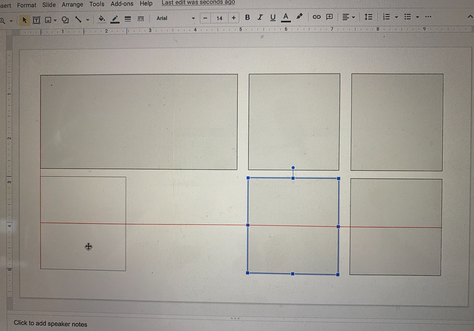
Gridlines in Google Slides to help with alignment and proximity
Future Designs
I was excited to read about Mayer's 12 Principles and Gestalt Theory. I think I am at the point of designing where knowledge of more design principles is appropriate. Mayer's principles' usefulness for video is also another next step for me.
I think a lot of these principles could be innate to a designer... not really knowing why we do something the way we do it... besides "this just looks better." But I wonder, if I continue to study these 12 principles, would my designs resonate more with my audience than they currently do? I also wonder if some of my students would benefit from the 12 principles instead of the basic 4 in CARP.
0 Comments
Your comment will be posted after it is approved.
Leave a Reply. |
Cindy KaardalThis blog page will follow my progress through completing a Master of Arts in Learning, Design, and Technology with Central Michigan University. Archives
April 2022
Categories
All
|

 RSS Feed